Floorball score & timer for Garmin watches

The floorball clock on your wrist.

Two modes in one app. Playing? Rink keeps the score, your goals, assists and time on court, and records the match in Garmin Connect. Keeping time? It runs the effective-time clock, penalties, time-outs, overtime and penalty shots per IFF rules.

2modes: player and timekeeper
70Garmin watches
10languages
€4.99once, no subscription

The timekeeper screen, live. Tap the left or right half to score for home or guests: the goal ends the right penalty by itself.

Two modes

One app for the player and for whoever keeps the time.

I play

For the player

Start the match and forget the watch. Rink shows the score, the period and its clock, your heart rate, and whether you are on court or on the bench.
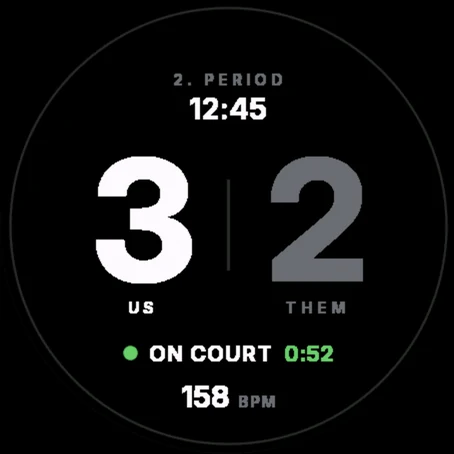
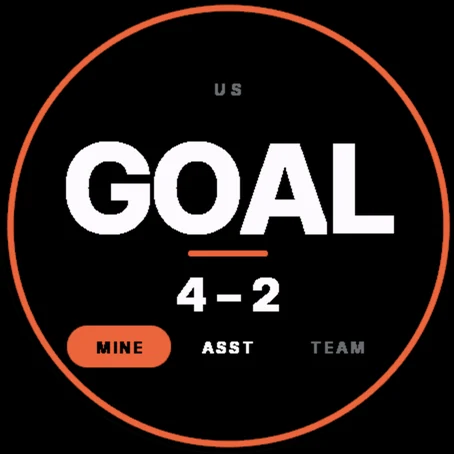
Player mode: score 3:2, second period 12:45, on court for 0:52, heart rate 158 Goal screen in player mode: GOAL, score 4–2 and the choice mine, assist or team
  • Tap the left or right half: a goal for us or for them
  • After our goal: mine, assist or teammate (it closes by itself after 5 s)
  • The LAP button switches on court / on the bench, with the time
  • Pause when you need to; a period ends only when you say so
I time

For the timekeeper

For the organiser, coach or referee of an amateur match or tournament with nobody at the timekeeper’s table.

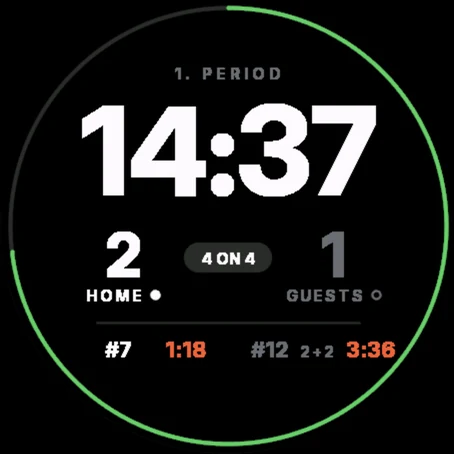
Rink timekeeper screen on a Garmin watch: period clock 14:37, score 2:1, 4 on 4 and two running penalties
  • START runs and stops the clock, effective or gross time
  • Hold a team’s half to give a penalty, with the player’s number
  • Penalties count down on the played time and end by themselves
  • Time-outs, the break between periods, overtime and penalty shots

Rules handled

The penalty maths, done for you.

Rink follows the IFF Rules of the Game 2026, so whoever keeps the time can trust the watch more than their own head.

01Effective or gross time

3×20, 3×15, 2×20, 2×15 or your own. With gross time the last 3 minutes of regular time are effective, and Rink tells you when they start.

02Penalties 2′, 2+2, 10′ and match

With the player’s number. A 10′ comes with a 2′ served by a teammate, so the team is not short; a match penalty keeps the player out for good. Opening the penalty picker stops the clock.

03A goal ends a penalty

A goal against a short-handed team ends its penalty with the least time left; with 2+2 only the running two. Goal from a penalty shot or on a delayed penalty? One tap on “Penalty continues”.

04Coincidental penalties

Penalties given at the same stoppage cancel out: they don’t change the number of players and goals don’t end them.

05Players on the floor

At most two bench penalties count down per team; the rest wait in order (“+1”). “4 ON 5” shows the strength at a glance.

06Time-outs

One per team, 30 seconds counted down in the ring, with a vibration at the end.

07Overtime and penalty shots

After a 2-minute break, 10 minutes to the first goal. Then penalty shots 5+5 and one by one after that; Rink works out the winner.

08END you can still correct

After the last regular period the clock freezes under END. A late goal, a penalty or an undo still go in; START decides: overtime on a tie, otherwise the summary.

09Clock correction

With the clock stopped: +10, +1, −1 or −10 seconds. Running penalties follow the corrected time.

10Undo

Every action can be taken back, and the menu says which one. Even the deciding goal, straight from the summary.

Rules as published by the International Floorball Federation (IFF). Rink is not affiliated with or endorsed by the IFF. In official league games the time is kept at the timekeeper’s table.

Three looks

Pick the one you read best in the hall.

The same moment of a match in each look. Switch in Settings, with a live preview on the watch.

Rink timekeeper screen on a Garmin watch: period clock 14:37, score 2:1, 4 on 4 and two running penalties

Clean

Black, white and grey with a single orange accent for penalties and your goals. Home in white, guests in grey.

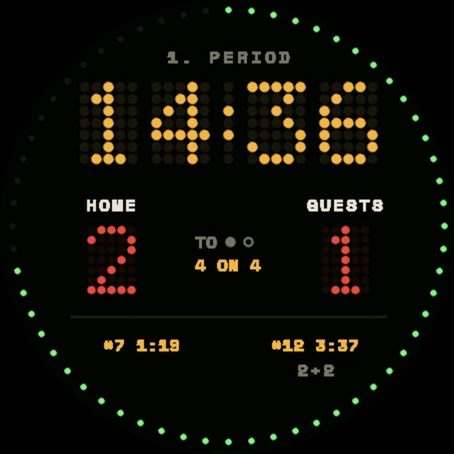
Scoreboard look: LED dot-matrix clock in amber and a red score

Scoreboard

The LED board from the sports hall: dot-matrix digits, an amber clock and a red score.

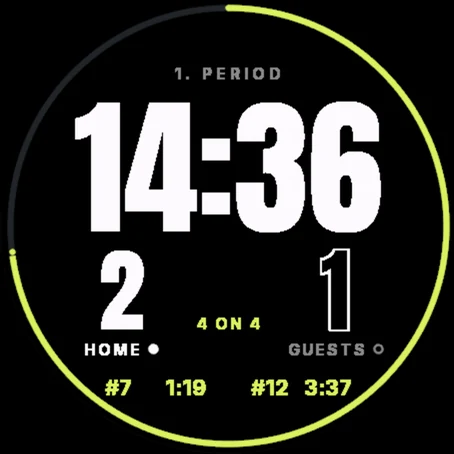
Poster look: giant clock, home score solid, guests in outline, lime accents

Poster

Giant numbers across the screen, home solid, guests in outline, and one lime colour.

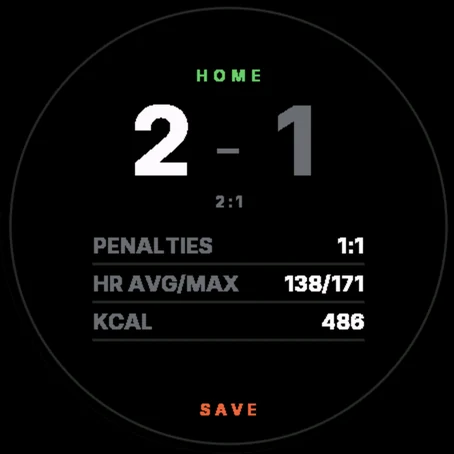
Timekeeper match summary: 2–1, penalties, heart rate and calories

After the final whistle

Floorball in Garmin Connect.

Garmin has no floorball profile, so Rink records a Field Hockey activity named “Floorball”: heart rate, calories and a lap per period. In “I time” the recording can be switched off.

Match summaryResult, score by period, your goals and assists, time on court, shifts, heart rate and calories. As timekeeper: every goal and penalty with its time.
HistoryYour last 50 matches on the watch, with the full goal and penalty log for the 10 newest.
Survives a closed appClose the app or restart the watch mid-match and it carries on where it stopped.

Touch or buttons

Built for the bench, not for menus.

Tap = goal

Left half for home (or us), right half for guests (or them). On 5-button watches: UP and DOWN.

Hold

As timekeeper: a penalty for the team on that side. As player: undo the last action.

Tap guard

A second touch within 1.5 s is ignored, so a bump with the stick doesn’t add a goal. Vibrations only, never a sound.

Compatibility

70 round Garmin watches, AMOLED and MIP.

Touch screen or buttons. English, Slovak, Czech, German, Spanish, French, Italian, Polish, Swedish and Finnish, following the watch or picked in Settings.

Venu 2 · 2 Plus · 2S · 3 · 3S · 4vívoactive 5 · 6Forerunner 70 · 165 · 170 · 255 · 265 · 570 · 955 · 965 · 970fēnix 7 · 8 · 9 · Eepix 2 · epix ProEnduro 3 · 4Instinct 3 AMOLED · Crossover AMOLEDMARQD2DescentApproach S50 · S70 · S72

Pricing

€4.99once
  • Both modes, all three looks, every update
  • No subscription, no account, no ads
  • Your matches stay on your watch
Get it on Connect IQ

Bought in the Garmin Connect IQ Store. There is no trial; changed your mind? Garmin refunds within 48 hours.

Questions

Is it for players or for referees?

Both. “I play” is for the player who wants the match, goals, assists and time on court in Garmin Connect. “I time” is for whoever keeps the time: organiser, coach or referee of a match without a timekeeper.

Can I use it for official league games?

Rink follows the IFF Rules of the Game, but it is not an official timekeeping system and is not affiliated with the IFF. In official games the time is kept at the table; Rink is made for amateur leagues, tournaments, training and youth games.

Do I have to touch the watch while I play?

Hardly. The period clock runs by itself and a goal is one tap. Press LAP when you go on or off court if you want your shift times.

What about shorter games?

3×20, 3×15, 2×20, 2×15 or your own number and length of periods, with effective or gross time. The break between periods is adjustable and overtime can be on or off.

What if the app closes mid-match?

Open it again and the match goes on where it stopped, with every goal, penalty and the clock kept.

Does it work without a touch screen?

Yes. On 5-button watches UP and DOWN score, START runs the clock, and penalties, time-outs and everything else are in the match menu.

How does it show up in Garmin Connect?

As a Field Hockey activity named “Floorball” (Garmin has no floorball type), with heart rate, calories and a lap for every period.

Does Rink collect any data?

No. Your matches stay on the watch, and the activity is saved by Garmin to your own Garmin Connect account.

Ready for the face-off.